Speaker-Diarized Call Transcription on a CPU — No Cloud, No GPU, No Hugging Face Token
I wanted a speaker-labeled, timestamped transcript of a two-person phone call — the kind an LLM can actually reason about (“what did the customer commit to?”, “when did the price come up?”) — without shipping the audio to a cloud speech-to-text service.
One hard constraint shaped every decision: it all had to run on hardware already in the rack. No new GPU, no API keys, no “just use the cloud for the hard part.” A 35-watt desktop chip that already earns its keep running other things.
It worked. And, as usual, the interesting parts weren’t in the happy path — they were in why the whisper I already had running couldn’t do the job, how to diarize speakers on a CPU with no Hugging Face token, and a genuinely great debugging story that ends with a 114-byte file quietly corrupting every timestamp in the system.
A note on the transcript examples below: the real test call involved an actual third-party business and named individuals who never agreed to be quoted. Every name, company, and phone number in the excerpts here is synthetic — invented for illustration. In many US states, Colorado included, recording calls and reusing what was said carries real legal weight. If you build one of these, redact before you publish. I’m practicing what I preach.
Teaching an AI to Develop My RAW Photos: A Self-Hosted Linux Pipeline
I wanted to answer a specific question: could an AI agent do the boring, careful parts of my photography workflow — the parts I actually skip because they take too long?
Not “make my photos look good” in the Instagram-filter sense. I mean the tedious, correct-but-thankless work: pulling the right RAW off my server, applying the exact lens-correction data for the exact lens I used, denoising only the frames that need it, keeping the EXIF intact, filing everything under the right date, and getting a print onto photo paper without fighting a driver. The stuff a careful darkroom tech would do and a busy human never quite gets around to.
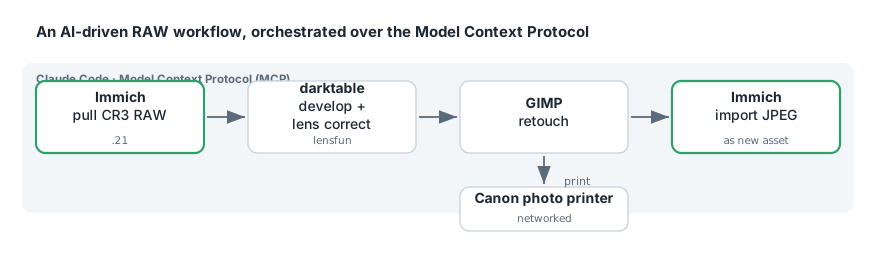
So I built it. A local, self-hosted pipeline where Claude Code can reach into my Immich library, pull original Canon CR3 RAW files, develop them in darktable with camera- and lens-specific corrections, retouch in GIMP, print on a networked Canon photo printer, and push finished JPEGs back into Immich as new assets — all driven through the Model Context Protocol (MCP).
Cheap Phone Service and Whole-House Intercom with FreePBX + SignalWire
Business phone service — RingCentral and the like — runs $20–35 per seat per month, locks your desk phones to their firmware, and puts your dial tone at the mercy of someone else’s cloud. I replaced all of it with a self-hosted PBX that costs a few dollars a month in actual usage, keeps every phone on hardware I own, and adds something the commercial offerings either charge extra for or simply don’t do: push-to-talk intercom between rooms. Dial the kitchen, it answers itself on speaker, you talk.
The whole thing is four Docker containers on one host, one DNS record on another, and a single SIP trunk in the cloud. Everything else is a text file.
A note on the examples: this runs on my real network with real family phone numbers on it. Every phone number, personal name, and account identifier below is synthetic — invented for illustration and drawn from the
555-01xxrange reserved for fiction. The configuration is real and copied verbatim from the running system; only the personal data is swapped. If you build one of these, keep your own credentials and family numbers out of your blog. I’m practicing what I preach.