Teaching an AI to Develop My RAW Photos: A Self-Hosted Linux Pipeline
- 15 minutes read - 3183 wordsI wanted to answer a specific question: could an AI agent do the boring, careful parts of my photography workflow — the parts I actually skip because they take too long?
Not “make my photos look good” in the Instagram-filter sense. I mean the tedious, correct-but-thankless work: pulling the right RAW off my server, applying the exact lens-correction data for the exact lens I used, denoising only the frames that need it, keeping the EXIF intact, filing everything under the right date, and getting a print onto photo paper without fighting a driver. The stuff a careful darkroom tech would do and a busy human never quite gets around to.
So I built it. A local, self-hosted pipeline where Claude Code can reach into my Immich library, pull original Canon CR3 RAW files, develop them in darktable with camera- and lens-specific corrections, retouch in GIMP, print on a networked Canon photo printer, and push finished JPEGs back into Immich as new assets — all driven through the Model Context Protocol (MCP).
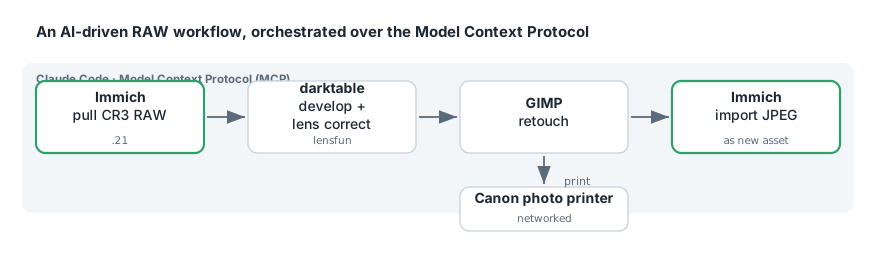
The end-to-end proof was a real production run: 141 Canon CR3 files developed and imported with zero failures.
But the happy path is not the story. The story is the six substantive bugs I had to find first — several of which quietly produced wrong-but-plausible output, the most dangerous kind. That’s what this post is really about.
The setup, briefly #
Everything runs on a Colorado desktop and a couple of servers on the LAN:
- Workstation: 8-core ThinkPad, Ubuntu 26.04, X11, 23 GB RAM.
- Immich host: a Docker box on the LAN running
immich_server, Postgres, and Redis. - Printer: a Canon PIXMA G600 photo printer, network-attached.
- Camera: Canon EOS R100 (24 MP APS-C), with the RF-S 18-45mm kit zoom and an old EF 75-300mm telezoom adapted onto the mount.
Two constraints shaped every decision, and they’ll be familiar to anyone running Linux on a machine they don’t fully own:
- No passwordless sudo. Almost everything had to install into my user account.
- No Node, no npm, no pip, no venv to start with.
uv— a single static binary that installs to~/.local/bin— got the whole Python side running without root.
The versions, for the reproducibility-minded: darktable 5.4.1, GIMP 3.2.2, Python 3.14, Immich v3.1.0, exiftool 13.50, lensfun 0.3.4.
The architecture: MCP is a control plane, not a data plane #
The first real lesson arrived before I’d processed a single photo, and it’s the one I’d attach to the whole project: MCP is superb for control and metadata, and useless for moving bytes.
I wired up three MCP servers so the agent could talk to each tool:
- GIMP — a plug-in hosts a TCP socket server inside GIMP’s own process; a stdio MCP server bridges to it. Commands run in GIMP’s Python-Fu environment (79 tools).
- darktable — completely different design. A Lua plug-in inside darktable polls a cache directory every ~100 ms for request files and writes responses. A filesystem mailbox, not a socket (10 tools).
- Immich — an HTTP MCP server exposing 49 tools for searching, tagging, and uploading.
Here’s the wrinkle. The Immich MCP server runs in a container on another host. It can list, search, tag, and even upload — but it cannot see my workstation’s filesystem. It can’t hand a RAW file to the darktable running locally, and it can’t upload a JPEG that exists only on my desk.
Worse, immich_server publishes no host port at all:
$ docker ps --format '{{.Names}}\t{{.Ports}}' | grep immich_server
immich_server    2283/tcp          # exposed, NOT published
It’s reachable only from inside the Docker network — and its container IP changes on every restart.
The fix is a small SSH tunnel helper that resolves the container’s IP at connect time, then forwards a local port to it:
IP=$(ssh -o BatchMode=yes "$HOST" \
  'docker inspect immich_server --format "{{range .NetworkSettings.Networks}}{{.IPAddress}}{{end}}"' \
  | tr -d '\r\n')
ssh -f -N -o ExitOnForwardFailure=yes -L "127.0.0.1:2283:$IP:2283" "$HOST"
(A health-check gotcha worth saving you an hour: /api/server/about requires auth and returns 401, so curl -sf reports failure even when the tunnel is fine. Use the unauthenticated /api/server/ping — it returns {"res":"pong"} — for liveness.)
The takeaway: the pragmatic design is a hybrid. MCP for the semantic layer — “find the photos from July 3rd, tag them, put them in this album.” A plain SSH-tunnel-plus-REST path for the bytes. Don’t try to push binary data through your control plane.
Bug #1: An unpinned dependency is a live grenade #
The very first server I installed died on arrival. The darktable MCP package declared mcp>=1.0.0; the resolver happily pulled mcp 2.0.0, which had removed the low-level API the server was built on. The server crashed instantly:
darktable_mcp - ERROR - Server error: 'Server' object has no attribute 'list_tools'
An MCP initialize handshake returned nothing at all. Pinning --with "mcp<2" fixed it — 10 tools then enumerated correctly.
The lesson is bigger than one package. An unpinned >=1.0.0 on a fast-moving protocol SDK is a grenade with the pin pulled. Always smoke-test an MCP server with a raw JSON-RPC initialize + tools/list over stdio before you assume it works. Don’t trust that it installed; prove that it answers.
Bug #2: The AI found the bug in my infrastructure, not my photos #
I was certain the Immich MCP server was already running on one of my hosts. It was not — or rather, it was, but not the one I thought, and the one I thought was thoroughly broken.
Investigation turned up:
- On the host I believed was serving it: a
docker-compose.yamlcreated weeks earlier, never started, and misconfigured — pointingIMMICH_BASE_URLat a port that something other than Immich answered, returning a bare404 page not found. - The actually working instance was on a different host and port entirely, and had been running for 26 hours.
Bringing up the broken one confirmed the misconfiguration and I tore it back down. This is the unglamorous reality of self-hosting: the “obvious” answer in your head diverges from what’s actually running, and the gap can sit there for weeks. The interesting part is that chasing a photography task is what finally surfaced a plumbing bug I’d been carrying blind.
Making darktable genuinely good for this camera #
This is the technical heart of the project, and where the payoff lives.
Out of the box, darktable’s default module stack for a CR3 does a competent job of demosaic, color, and tone — but look at what’s absent: no lens correction, no denoising, no sharpening, no chromatic-aberration correction. For a soft, adapted telezoom shot wide open at ISO 1250–1600 — which describes most of my wildlife frames — that’s a lot of free quality left on the table.
I didn’t want to guess at the pipeline. I recovered the real module stack empirically, by exporting into a real (non-memory) library and reading the history back out of SQLite:
darktable-cli in.CR3 out.jpg --core --configdir ~/.config/dt-probe \
  --library /tmp/probe.db --conf write_sidecar_files=TRUE
sqlite3 /tmp/probe.db 'SELECT operation, enabled FROM history ORDER BY num'
Bug #3: The CLI and the GUI disagreed on the tone mapper #
My darktable GUI was configured for the filmic tone mapper. The command-line config defaulted to sigmoid. So every CLI export I made looked subtly different from what I saw in the darkroom — and I’d never have caught it by eye.
The non-obvious part: editing darktablerc does not fix this. The tone mapper is applied by an auto-apply preset stored in data.db, created when the config directory is first initialized. Change the rc afterward and nothing happens.
The only fix is to recreate the config dir with the setting supplied on the very first run:
rm -rf ~/.config/darktable-cli && mkdir -p ~/.config/darktable-cli
darktable-cli sample.CR3 /tmp/init.jpg --width 300 --core \
  --configdir ~/.config/darktable-cli --library :memory: \
  --conf "plugins/darkroom/workflow=scene-referred (filmic)"
Some settings are baked at birth. If the config is wrong, you don’t edit it — you re-pour it.
The noise-profile problem — and a wrong turn worth showing #
darktable ships measured noise profiles for 94 Canon bodies. The EOS R100 isn’t one of them. Without a profile, profiled denoise has nothing to work from — and 44 of 74 sampled wildlife frames were shot at ISO 1250–1600, exactly where it matters.
My first attempt was wrong, and instructively so. I cloned the EOS M50 Mark II profile, reasoning that the R100 shares the same 24 MP APS-C sensor generation. Plausible! And completely unverifiable by eye.
The correct answer came from a GitHub search that turned up darktable issue #19157 — an open issue with a real measured R100 profile attached, 22 ISO steps from 100 to 12800.
Comparing the substitute against the real measurements at the ISOs I actually shoot showed how badly the “same sensor” assumption failed:
| ISO | substitute ÷ measured (R / G / B) |
|---|---|
| 100 | 1.32 / 1.59 / 1.36 |
| 800 | 1.50 / 1.75 / 1.53 |
| 1250 | 1.53 / 1.74 / 1.55 |
| 1600 | 1.51 / 1.73 / 1.48 |
| 6400 | 1.36 / 1.63 / 1.27 |
The M50 II substitute overestimated noise by up to 1.75×, worst on the green channel, precisely at my working ISOs. Denoise driven by those numbers would have smoothed roughly 70% harder than warranted — scrubbing fur, feather, and foliage detail out of the exact wildlife frames it was meant to rescue. The R100 sensor is measurably cleaner than the M50 II. The “same sensor generation” hunch was simply false.
An honest caveat I’m keeping in: a darktable maintainer called that community profile weak and asked for a re-shoot that never happened, which is why 5.4.1 still ships nothing for the R100. Reading the attached measurement report shows why — the target’s tonal coverage runs thin at the highlight end, so the highlight fit is extrapolated while shadows and midtones are well-constrained. For high-ISO wildlife, where shadow noise is the real enemy, that’s the right way round. It’s a defensible choice, not a blind one.
Bug #4: Lens correction was impossible in two different ways #
Neither lens could be corrected at first, for two independent reasons:
- lensfun didn’t have them. Ubuntu’s lensfun data package was dated July 2023. It had no RF-S 18-45, no EOS R100 body, and none of the EF 75-300 variants under the name my EXIF actually reports.
- darktable’s “embedded metadata” method doesn’t cover Canon. darktable 5.x can read some vendors’ in-file correction data — but string analysis of the binary shows it parses Sony, Fujifilm, Nikon, Olympus, and Pentax tags. There is no Canon equivalent.
exiftool confirmed it directly on a real CR3:
Peripheral Lighting Setting     : On
Chromatic Aberration Setting    : On
Distortion Correction Setting   : Off
Digital Lens Optimizer          : Standard
Vignetting Corr Version         : 80
Canon records correction flags and a version number — the actual coefficient tables live in Canon’s own DPP lens database and never touch the file. lensfun was the only possible route, which made updating it mandatory rather than nice-to-have.
And updating it needed root, because liblensfun 0.3.4 hard-codes exactly two search paths and honors no environment override. The package that provides the updater is liblensfun-bin (not the plausibly-named-but-nonexistent lensfun-tools):
sudo apt install liblensfun-bin libimage-exiftool-perl
sudo lensfun-update-data
Afterward, the updated database contained both the EOS R100 body and a fully calibrated RF-S 18-45mm — distortion at five focal lengths plus vignetting. The relevant Canon lens count jumped from 24 to 44.
A July 2023 data package made a 2023 camera and its kit lens uncorrectable. Distro data packages age badly, and silently. One sudo lensfun-update-data fixed both lenses at once.
The trap that would have corrected the wrong lens #
Here’s the subtle one. Three different exiftool tags disagree about which lens took the shot:
| tag | RF-S 18-45 | EF 75-300 |
|---|---|---|
LensType | “Canon RF 50mm F1.2L USM or other RF Lens” ❌ | Canon EF 75-300mm f/4-5.6 ✅ |
LensModel | RF-S18-45mm F4.5-6.3 IS STM ✅ | RF75-300mm F4-5.6 ❌ (adapter prefix) |
LensID (composite) | RF-S 18-45mm F4.5-6.3 IS STM ✅ | EF 75-300mm f/4-5.6 ✅ |
LensID is the only tag correct for both lenses, and it happens to match the string darktable itself stores. My first implementation used LensType — and silently selected the wrong lens entirely for the RF-S. It would have “corrected” every kit-zoom frame using a 50mm prime’s optical profile, and produced plausible-looking, subtly-wrong output forever.
Verify with numbers, not eyeballs #
I refused to sign off on lens correction by squinting at before-and-afters. Instead I measured corner-versus-centre mean luminance:
| frame | corner brightening | centre |
|---|---|---|
| EF 75-300 @ 300mm, f/5.6 | +13.5 … +18.1 | 0.0 |
| RF-S 18-45 @ 45mm, f/9 | +3.7 … +6.2 | 0.0 |
A centre delta of exactly zero is the signature of correct vignetting correction — the correction lifts the darkened corners without touching the already-correct middle. And the magnitudes scale with aperture the way real optics do: heavy wide open on the telezoom, mild stopped down. That pattern is strong evidence the calibration data genuinely matches the lens, rather than garbage being applied confidently. Numbers catch what eyeballs rationalize.
Printing: no driver required #
Discovery via mDNS turned up the printer instantly:
avahi-browse -rt _pdl-datastream._tcp
→ a Canon G600 advertising IPP Everywhere and Mopria 2.0. No Canon driver is needed — driverless IPP exposes the full photo-media list and quality range, and the whole queue is one lpadmin line:
lpadmin -p Canon_G600 -E -v ipp://<printer-ip>:631/ipp/print -m everywhere
Two practical notes:
- Canon paper stocks are vendor keywords (
com.canon.mtglossy), not the generic IPP names — you have to feed the printer its own vocabulary. - A 3:2 camera frame fits 4×6 exactly; 5×7, 8×10, and Letter all crop. At 6024 px wide, even an 8×10 receives ~600 dpi into a 600 dpi printer. Resolution is never the constraint. Framing is.
The production run: 141 frames #
The real test: a folder of 141 CR3 files (~2.5 GB) from an event shoot on July 3rd — all R100 + RF-S 18-45, ISO 100–3200, 81 frames at ISO ≥ 800. And two final bugs were waiting.
Bug #5: darktable silently strips almost all EXIF #
Spot-checking an export, I found that only DateTimeOriginal had survived. Make, Model, LensModel, ISO, aperture, shutter, focal length — all gone. Every export up to that point was affected.
The cause: plugins/lighttable/export/metadata_flags is empty in the shipped darktablerc, and empty means strip. Setting it to 1 restores the full set:
sed -i 's|^plugins/lighttable/export/metadata_flags=.*|plugins/lighttable/export/metadata_flags=1|' \
  ~/.config/darktable-cli/darktablerc
For a photo-library workflow this is enormous. Without it, every processed image lands in Immich as an anonymous JPEG with no camera, no lens, no exposure data — a library full of amnesiac photos. The images looked perfect. The metadata was quietly being thrown away.
Bug #6: Parallel darktable-cli destroys itself #
To go faster I ran two workers with xargs -P 2 against one config dir. It failed 20 of the first 21 frames. The surfaced error was a red herring (“darktable did not write a sidecar”); the log told the truth:
[init] the database lock file contains a pid that seems to be alive: 115789
ERROR: can't acquire database lock, aborting.
darktable takes an exclusive lock on the config directory’s data.db. Concurrent instances sharing a config dir all abort but the first. Two traps compound it: a killed run leaves a stale .lock file that blocks the next start, and partial output files will fool any “skip if the output already exists” resume logic into accepting truncated JPEGs as finished work.
The fix: give each worker its own copy of the config directory. After that — 132 frames, 0 failures.
Getting the dates right #
One more subtlety: my uploader originally stamped each asset’s creation time from the file’s mtime — meaning a July shoot processed in August would file itself under August. I changed it to read DateTimeOriginal via exiftool, falling back to mtime. (In practice Immich re-derives its own date from the embedded EXIF anyway, so that’s the field to verify — which is exactly why Bug #5 mattered so much.)
The verified result #
| check | result |
|---|---|
| Album Diana’s Event Center 2026-07-03 | 141 assets |
| Capture dates | all 2026-07-03 |
| Gear recorded on every frame | Canon EOS R100 + RF-S 18-45mm |
| Missing EXIF | 0 |
| Processing failures | 0 |
| Upload failures | 0 |
| ISO span | 100–3200, 81 frames ≥ 800 (denoise engaged on exactly those) |
Checked at 100% on an ISO 2500 indoor frame: individual sequins on a gold backdrop stayed distinct, and a red curtain kept its fabric grain. Denoise was working without smearing texture — the whole point of getting the noise profile right.
What I’d tell you if you’re building your own #
Five things survived this project as durable lessons:
- MCP is a control plane, not a data plane. The Immich MCP couldn’t move a single byte to local disk. A hybrid — MCP for the semantic layer, tunnel + REST for the bytes — is the honest architecture.
- The AI found the bug in my infrastructure, not just my photos. The MCP server I believed was running had never started, and was misconfigured. Automating a task is a great way to discover what you’d been assuming.
- Silent wrongness is the real enemy. Three separate failures produced plausible output: EXIF stripped but images fine; the wrong lens profile selected from an ambiguous tag; a noise profile from the wrong camera that would have over-smoothed by 70%. None of these announce themselves. You only catch them if you go looking.
- Verify with numbers, not eyeballs. Corner-vs-centre luminance deltas. Noise standard deviation in a defocused patch. Coefficient-ratio tables. Every one of them caught something a visual check would have waved through.
- Distro data packages age badly. A July 2023 lensfun database made a 2023 camera and its kit lens uncorrectable — for reasons that look like a bug in your setup, not stale data.
The Colorado angle #
The wildlife test frames that motivated all the denoise work? Mule deer in the foothills at dusk — the exact high-ISO, long-lens, low-light situation this whole pipeline was built to handle. Getting the R100’s real noise profile in place, instead of a plausible substitute that would have smeared away the fur, is the difference between a keeper and a mush of over-processed pixels. Out here the good light is often the low light, and the camera you have is the one you tune for.
Honest loose ends #
No project ships clean. For the record:
- There are no white-balance presets for the R100 upstream (darktable has them for the R7 and R10). Genuinely missing, and contributable.
- The R100 noise profile still isn’t merged upstream — it lives in an open issue.
- Injecting auto-apply presets via SQL into
data.dbnever worked; I fell back to XMP sidecars. - The camera was set to lossy compressed RAW. For shadow-lifting at high ISO, uncompressed RAW would buy more latitude — a menu change that arguably outweighs a lot of the software tuning.
That last one is the humbling coda: after all the coefficient tables and byte-offset reverse-engineering, the single biggest quality lever might be a setting in the camera menu. Which is exactly the kind of thing you only learn by building the whole pipeline and measuring the result.