A Valid TLS Cert for a LAN-Only Home Assistant: Traefik, DNS-01, and Split-Horizon DNS
- 6 minutes read - 1105 wordsHere’s a puzzle that trips up a lot of homelabbers: you want a publicly-trusted TLS certificate for a service that is only ever reachable on your LAN. No port forwarding, no exposing the box to the internet — but also no browser warnings, no self-signed-cert clicking-through, and no private CA to install on every device.
The specific thing that forced my hand: I wanted to connect Claude.ai’s remote MCP connector to my Home Assistant instance, and that connector flatly refuses plain HTTP. It demands a valid https:// endpoint. My HA is a sealed Green appliance at 192.168.1.18:8123, LAN-only, and I had no intention of exposing it to the world.
The answer is a nice combination of three ideas — a Let’s Encrypt DNS-01 challenge, a wildcard certificate, and split-horizon DNS — wired together with Traefik. This post is the worked example.
Why the usual approach doesn’t work #
The default Let’s Encrypt flow (HTTP-01 challenge) proves you control a domain by having the CA hit http://your-host/.well-known/... on port 80. That requires your host to be publicly reachable, which is exactly what I’m refusing to do. So HTTP-01 is out.
DNS-01 is the escape hatch. Instead of serving a challenge file, you prove control by creating a DNS TXT record. The CA checks DNS — it never has to reach your server at all. Which means you can get a real cert for a hostname that resolves to 192.168.1.21 on your LAN and nowhere on the public internet.
The building blocks #
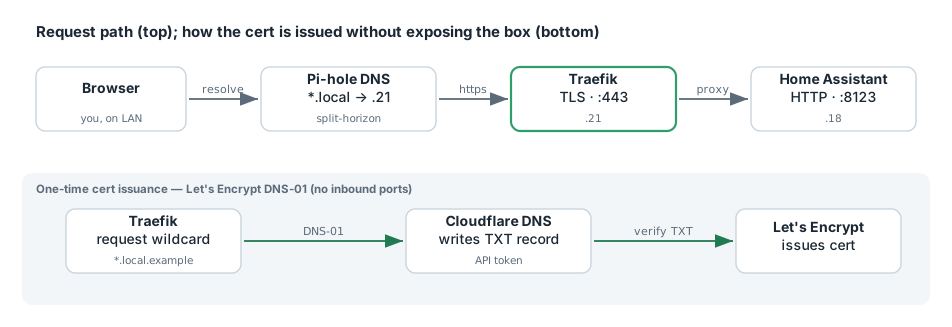
My setup on fileserv (192.168.1.21):
- Traefik already running in Docker, routing several services via Docker labels, with a Cloudflare DNS-01 cert resolver already configured (the Cloudflare API token wired in as a Docker secret).
- The pleasant surprise when I inspected it: the existing dashboard router already requests a wildcard cert for
*.local.louvethome.com. That single wildcard already covershome-assistant.local.louvethome.com— no new cert issuance needed at all. A wildcard is the gift that keeps giving: every future*.local.louvethome.comservice is pre-covered. - Pi-hole as the LAN DNS resolver (for split-horizon).
- HA Green at
.18:8123— a sealed appliance: I can’t editconfiguration.yamlover SSH, only through the File Editor / Studio Code Server add-ons in the HA UI.
The .local. in the hostname is deliberate. It’s not a TLD trick — it’s just a label convention signaling “this name only resolves inside my network.”
Step 1: teach Traefik about a non-Docker backend #
Traefik was discovering routes purely from Docker labels. But HA is an external (non-Docker) backend, so I needed the file provider for this one route. Two small static-config additions:
# traefik.yml — enable the file provider
providers:
  file:
    directory: /dynamic
    watch: true
# docker-compose.yaml — mount the dynamic dir onto the traefik service
    volumes:
      - ./data/dynamic:/dynamic:ro
(Changing a volume mount means docker compose up -d to recreate — docker compose restart won’t pick up new mounts. A small gotcha that costs people ten minutes.)
Step 2: the route itself #
data/dynamic/home-assistant.yml:
http:
  routers:
    home-assistant:
      rule: "Host(`home-assistant.local.louvethome.com`)"
      entryPoints:
        - https
      service: home-assistant
      tls:
        certResolver: cloudflare
        domains:
          - main: local.louvethome.com
            sans:
              - "*.local.louvethome.com"
  services:
    home-assistant:
      loadBalancer:
        passHostHeader: true
        servers:
          - url: "http://192.168.1.18:8123"
Two details that matter:
- The
tls.domainsblock mirrors the existing wildcard, so Traefik reuses the cert already inacme.jsonrather than issuing a fresh per-host cert. If you skip this, you may get an unnecessary new cert just for the one hostname. passHostHeader: true— Home Assistant is picky about theHostheader (see the next step).
Step 3: tell Home Assistant it’s behind a proxy #
This is the step everyone forgets, and the symptom is a confusing “Invalid Host header” / 400 error. HA rejects proxied requests unless you explicitly trust the proxy. In the HA UI (File Editor or Studio Code Server), add to configuration.yaml:
http:
  use_x_forwarded_for: true
  trusted_proxies:
    - 192.168.1.21
(If an http: block already exists, merge — don’t duplicate the key.) Then Developer Tools → YAML → Check Configuration to catch typos before you restart, then restart HA (~30–60s on a Green).
Step 4: split-horizon DNS in Pi-hole #
The hostname must resolve to Traefik (.21) on the LAN — and only on the LAN. In Pi-hole, either add a per-host Local DNS record, or — better if you keep adding services — a wildcard via dnsmasq:
# /etc/dnsmasq.d/02-louvethome.conf on the Pi-hole host
address=/local.louvethome.com/192.168.1.21
then pihole restartdns. Now any *.local.louvethome.com resolves to Traefik automatically — no new DNS record per service. (Pick wildcard or per-host records, not both for the same name.)
I explicitly did not create a public A record pointing at 192.168.1.21. Some guides suggest it “so DNS-01 works,” but DNS-01 only needs the TXT record during issuance — it never needs an A record or any reachability. Publishing your private LAN IP in public DNS buys you nothing here.
Step 5: verify in order #
Order matters — do HA’s trusted_proxies change before the Traefik route so there’s never a window where the proxy works but HA rejects the host header.
# 1. DNS resolves on LAN to Traefik
dig +short home-assistant.local.louvethome.com @<pihole-ip>     # → 192.168.1.21

# 2. Traefik picked up the router (dashboard → HTTP Routers → "home-assistant@file", green)

# 3. Cert is the existing wildcard, not a fresh one
echo | openssl s_client -connect home-assistant.local.louvethome.com:443 \
  -servername home-assistant.local.louvethome.com 2>/dev/null \
  | openssl x509 -noout -subject -issuer -dates
# → subject CN=*.local.louvethome.com, issuer Let's Encrypt

# 4. HA answers through the proxy
curl -I https://home-assistant.local.louvethome.com/          # → 200 / 302

# 5. API check with a long-lived token
curl -H "Authorization: Bearer $LLAT" \
  https://home-assistant.local.louvethome.com/api/            # → {"message":"API running."}
If step 4 shows “Invalid Host header,” HA wasn’t restarted or trusted_proxies didn’t apply. If step 3 shows a fresh single-host cert instead of the wildcard, the tls.domains block didn’t take — check docker exec traefik ls /dynamic.
Takeaways #
- DNS-01 decouples cert issuance from reachability. A LAN-only service can hold a real, publicly-trusted cert because the CA only ever checks DNS.
- A wildcard cert pre-covers every subdomain. Issue
*.local.louvethome.comonce and every future service is already covered. - Split-horizon DNS keeps it private. Pi-hole resolves the name to Traefik on the LAN; it resolves nowhere on the public internet. No port forwarding, ever.
trusted_proxiesis mandatory for Home Assistant behind a proxy — the “Invalid Host header” error is almost always this.- Use the file provider for non-Docker backends, and recreate (not restart) Traefik when you change mounts.
End result: https://home-assistant.local.louvethome.com with a green padlock, reachable only inside my house, and the Claude.ai MCP connector attaches without complaint.