Two Ways My Self-Hosted Immich Broke — and Neither Was Corrupt Data
- 6 minutes read - 1260 wordsI self-host Immich for my photo library, and it has broken on me in two completely different ways — both instructive, and both sharing a reassuring punchline: the photos were always fine. The failures were in the plumbing around them, not the data.
The first was a storage problem wearing a data-corruption costume: thousands of “unsupported image format” and “input file is missing” errors for files that were perfectly healthy. The second was a self-inflicted supply-chain problem: an overnight auto-update yanked the database extension out from under the server and put it in a boot loop. This post is both stories, because together they’re a decent field guide to operating Immich in a homelab.
The topology, because it matters #
Immich runs in Docker on fileserv (192.168.1.21): immich_server, immich_postgres, immich_redis, Portainer-managed. ML is offloaded to a remote host. The web/API is at https://immich.local.louvethome.com:2283, TLS terminated at a reverse proxy — the container itself speaks plain HTTP.
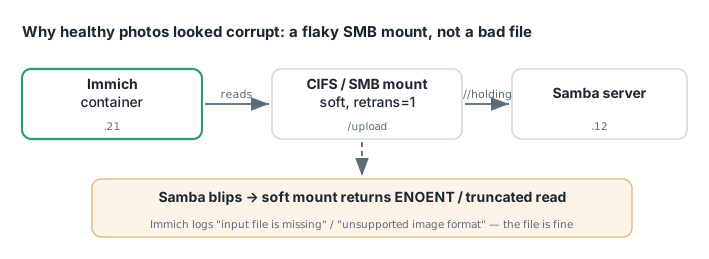
The detail that causes the first outage: the upload store is not local disk. It’s a CIFS/SMB mount from another box (//192.168.1.12/holding → the container’s /usr/src/app/upload), mounted with soft,retrans=1,actimeo=1. Remember that soft. It’s the villain.
Story 1: “unsupported image format” for files that are perfectly fine #
The symptom looked terrifying. Immich’s logs filled with thousands of errors — one outage window logged ~2,300, another ~648:
Error: Input file is missing
Error: unsupported image format               ← for a normal, healthy JPEG
“Unsupported image format” and “input file is missing” sound like corruption or a bad decoder. They are neither. Here’s the actual mechanism:
The upload store is a soft-mounted SMB share. When the Samba box on the other end hiccups — even for a moment — a soft mount returns an error immediately (EHOSTDOWN / ENOENT) instead of retrying like a hard mount would. Immich asks the filesystem for a file, the flaky mount says “gone” or hands back a truncated read, and Immich faithfully reports “missing” or “unsupported format.” The file on the share is completely intact. The mount lied for a fraction of a second, and the error got attributed to the file.
This is the crucial operational lesson: these are not corrupt files. Before you delete anything, confirm the file exists on the mount. I cannot overstate how tempting it is to see “unsupported image format” and start purging “bad” assets — which would destroy healthy photos to work around a network blip.
Recovery #
Two moving parts:
- Unstick the queue. The thumbnail queue can freeze — symptom:
active:20pegged,waitingnot draining, the log looping “Waiting for thumbnailGeneration queue to stop.” Adocker restart immich_serverclears the zombie active jobs. - Re-run generation. Via the Jobs API:
PUT /api/jobs/thumbnailGeneration {"command":"start","force":false} # missing-only PUT /api/jobs/thumbnailGeneration {"command":"start","force":true} # rebuild ALL (fixes already-broken thumbnails)force:falseonly fills gaps;force:truerebuilds everything, which is what repairs thumbnails that were broken by a past blip.
A reporting gotcha to know: jobCounts.failed reads 0 even during real failures (Immich uses removeOnFail). Don’t trust it — read the container log for genuine failures. Handily, the job id in the log is the asset id, so you can trace any failure straight to the photo.
The actual fix #
Recovery is treating symptoms. The cure is the mount: change soft → hard (or at least raise retrans/actimeo) so a momentary Samba stall becomes a brief pause instead of a wall of “corruption” errors. A media store you can’t afford to have blink should not be on a soft mount.
Story 2: Watchtower auto-updated the server out from under the database #
Months later, a different failure: immich_server in a hard boot loop, restart: always cheerfully restarting it every few seconds. The logs:
Error: No vector extension found. Available extensions: vchord, vector
microservices worker exited with code 1
Killing api process
The root cause was Watchtower. The compose had com.centurylinklabs.watchtower.enable=true on the server, and Watchtower had auto-updated immich-server to v3.0.1 overnight (the image was created at 03:33 that morning). Immich v3.0 dropped support for pgvecto-rs — but my database was still tensorchord/pgvecto-rs:pg14-v0.3.0, which provides the old vectors extension. The new server only accepts VectorChord (vchord) or pgvector (vector), found neither, and crashed on startup forever.
The commented-out #image: ...:2.2.1 in the compose was the ghost of my last known-good version. Watchtower on a stateful app with a coupled database is a loaded footgun — the app and its DB have to move in lockstep, and an unattended updater doesn’t know that.
The migration, and the version match that made or broke it #
I chose to migrate forward to VectorChord rather than roll back. This is a one-way data migration, so step one was a backup — and the datadir wasn’t readable as my user (owned by the container’s postgres uid, no sudo on that host), so I took a physical backup through a throwaway container that could read it as root:
docker run --rm -v "$(pwd)/postgres:/data:ro" -v "$(pwd):/backup" alpine \
  sh -c "tar czf /backup/postgres-datadir-backup.tar.gz -C /data ."   # 661 MB
Then the detail that actually determined success. I checked the installed extension version:
docker exec immich_postgres psql -U postgres -d immich -tA \
  -c "SELECT extname||' '||extversion FROM pg_extension ORDER BY 1;"
# → vectors 0.3.0
My data was written by pgvecto-rs 0.3.0. The default Immich migration image bundles pgvectors 0.2.0 — older. Loading 0.3.0 data under a 0.2.0 extension is a downgrade that fails to read the data. So I hunted the container registry for an exact match and found one:
ghcr.io/immich-app/postgres:14-vectorchord0.4.3-pgvector0.8.0-pgvectors0.3.0
That image bundles VectorChord 0.4.3, pgvector 0.8.0, and pgvecto-rs 0.3.0 — matching my installed vectors 0.3.0 exactly, so no downgrade. I also removed the custom command: line from the compose (its shared_preload_libraries=vectors.so would prevent vchord from loading; the Immich image manages its own preload).
Bring up the database first, confirm it loads both the old extension (to read the data) and the new one, then start the server. Immich auto-migrated on startup:
Creating VectorChord extension
Reindexed clip_index   (59,837 rows)
Reindexed face_index   (48,978 rows)
No schema drift detected
Finally, drop the now-vestigial old extension (after confirming no columns still use its type) to clear the harmless-but-noisy Failed to maintain vector indexes: Failed to create RPC client warnings:
DROP EXTENSION IF EXISTS vectors CASCADE;
DROP SCHEMA IF EXISTS vectors CASCADE;
End state: all three containers Up (healthy), RestartCount=0, active extensions vchord 0.4.3 + vector 0.8.0. The database image is now digest-pinned so it can’t drift again.
Takeaways #
- “Unsupported image format” / “input file is missing” from a networked store usually means the mount, not the file. Confirm the file exists before deleting anything — a
softSMB mount turns a momentary stall into a wall of fake corruption. - Don’t run Watchtower unattended on a stateful app with a coupled database. The app and its DB must move together; pin the DB image by digest and control server upgrades deliberately.
- On a DB extension migration, match the extension version exactly. The default migration image shipped an older pgvecto-rs than my data used; picking the version-matched image is the whole ballgame.
- Back up before a one-way migration — and if the datadir isn’t readable, a throwaway root container will read it for you.
- Know your tool’s lying metrics. Immich’s
jobCounts.failedreads 0 during real failures; the container log is the source of truth, and the job id is the asset id.
Two outages, two root causes, zero lost photos. In a homelab, most “my data is corrupt” panics are really “my infrastructure blinked.”