After the Rip: Auto-Naming a Home Media Library for Jellyfin with Python, TMDB, and ffprobe
- 6 minutes read - 1193 wordsGetting video off a disc is the part everyone talks about. The part that actually eats your evenings is everything after: a folder full of title_t00.mkv, disc1/, C3_t01.mkv files that mean nothing to a media server. Jellyfin wants very specific names and folder layouts, and if you don’t give them to it, you get “Unknown Movie,” mismatched episodes, and bonus features scattered as phantom entries.
So I extended a post-processing step into a proper Python pipeline that takes whatever came out of my ripping setup and turns it into a Jellyfin-perfect library: correct movie names with IMDb IDs, TV episodes matched to the right SxxExx, extras bucketed into the folders Jellyfin recognizes, then rsynced to the NAS and scanned in — with an ntfy ping at the end. This post is about that pipeline. It is deliberately not about disc decryption — it starts the moment you have plain .mkv files.
The problem Jellyfin actually has #
Jellyfin’s scanner is good, but it matches on names. Give it title_t00.mkv and it shrugs. Give it exactly this and it auto-matches with zero manual metadata editing:
Talk to Me (2022) [imdbid-tt9764362]/Talk to Me (2022) [imdbid-tt9764362].mkv
The Penguin (2024) [imdbid-tt15435876]/Season 01/The Penguin - S01E03 - ...mkv
The IMDb ID in the folder name is the magic — it removes all ambiguity, so a movie with a generic title or a wrong year still lands on the correct entry. Getting there from a ripper’s output is the whole job, and it breaks into a handful of distinct passes.
One script, standard library only #
I built this as a single Python file (media_move.py) with a hard constraint: standard library only — urllib.request, sqlite3, subprocess, argparse, dataclasses, re. No pip install, no venv to activate, just python3 media_move.py. It shells out to ffprobe, rsync, and curl, all of which are already on a media box. That constraint means the script survives OS upgrades and drops onto any host without a dependency dance.
Every destructive action is gated behind flags so you can watch before you commit:
--dry-run     # print what would happen, touch nothing
--no-rsync    # do everything except move to the NAS
--no-scan     # skip the Jellyfin library refresh
--no-notify   # skip the ntfy summary
--only SUBSTR # operate on just matching folders
--ignore-cache
The passes #
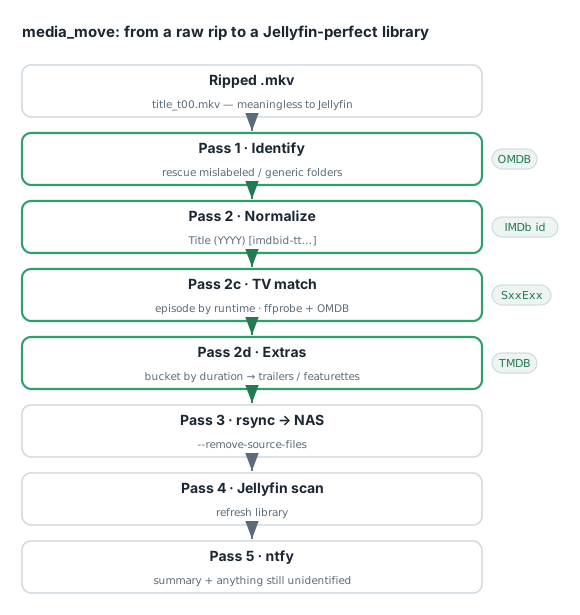
The pipeline runs as ordered passes, each solving one specific failure mode:
Pass 1 — rescue the unidentified. Ripped folders that ended up mislabeled or generically named get a first identification attempt (OMDB lookup by title/year) before anything else touches them.
Pass 2 — normalize movies. Hyphens, underscores, and dots in the ripper’s titles get cleaned up, the OMDB match resolves the canonical title + year + IMDb ID, and the folder/file are renamed to the Jellyfin form Title (YYYY) [imdbid-ttNNNNNNN]/. Because the IMDb ID is embedded, the scan matches with no metadata edits.
Pass 2c — TV episode matching by runtime. This is the clever bit. Consumer discs don’t label episodes — the ripper only knows “title N, X seconds.” So how do you know which .mkv is S01E03? Match on duration. OMDB returns per-episode runtimes; ffprobe gives each file’s runtime; match within a tolerance (I use ~3 minutes) and walk them into Season 01/Show - SxxExx. It’s heuristic, but episode runtimes are distinctive enough that it works remarkably well. (When a disc is missing — say Penguin disc 3 — the pass notes the gap and an ntfy alert asks me to insert it. One run actually fired a “need disc 3” alert, and a follow-up correctly cancelled it once the disc turned out already done.)
Pass 2d — bucket the extras. Bonus features are the messiest part. Jellyfin reads specific subfolder names and tabs their contents: trailers/, featurettes/, behind the scenes/, interviews/, deleted scenes/. With no per-extra metadata on the disc, duration is the only signal, so the script buckets by length:
< 3 min   → trailers/
< 20 min  → featurettes/
>= 20 min → behind the scenes/
Optionally, if a TMDB API key is present, it queries /movie/{id}/videos and borrows nicer names for extras that TMDB happens to know (e.g. “Backstage of the Madness” instead of “Featurette 1”). Two honest caveats I built in and documented rather than pretended away:
- TMDB coverage is uneven — maybe ~50% of disc extras on new releases have a TMDB entry, far less on older catalog titles. Generic numbering is the realistic 80% case.
- The duration buckets are heuristic — a 12-minute “deleted scenes compilation” gets filed under
featurettes/because the script can’t see inside it. Jellyfin still displays it, just under a slightly wrong tab. Also note: the/videospayload’ssizefield is video resolution, not runtime — a trap if you try to match extras by it.
Pass 3 — rsync to the NAS. Movies go to .../Videos/movies/, shows to .../Videos/Shows/, with --ignore-existing --remove-source-files, then empty source dirs get pruned. --remove-source-files means the local staging area cleans itself as files land safely on the NAS.
Pass 4 — refresh Jellyfin. Trigger a library scan so the newly-named content is picked up immediately, no waiting for the scheduled scan.
Pass 5 — ntfy summary. A final push notification summarizes counts and lists anything still unidentified, so I know at a glance whether the run was clean or needs a look.
A persistent cache so you’re not hammering the APIs #
Repeated runs (and --dry-run iterations) shouldn’t re-query OMDB/TMDB every time. The script keeps a small SQLite cache (media_move_cache.db) keyed like omdb:t=Title&y=YYYY and tmdb:movie/{id}/videos:, with a 24-hour TTL. Re-running is fast and API-friendly.
The one edge that bit: the label race #
The most interesting bug wasn’t in my code — it was a UI/DB sync issue in the ripper itself, where the database and the web UI disagreed about a job’s label after a rename. Worth flagging as a general lesson: when you post-process another tool’s output, you inherit its state model. My pipeline renames on the filesystem; if the upstream tool also tracks that name in its own database, the two can drift. I keep the rename authoritative on disk and let the library scan be the source of truth, rather than trying to reach back into the ripper’s DB.
Takeaways #
- The rip is easy; the naming is the work. Jellyfin matches on names — the IMDb-ID folder convention (
Title (YYYY) [imdbid-tt…]) removes all ambiguity and needs no manual metadata. - Match TV episodes by runtime. Discs don’t label episodes; OMDB per-episode runtimes +
ffprobedurations + a tolerance window does the job. - Bucket extras by duration into Jellyfin’s known folders. It’s heuristic and imperfect, and that’s fine — document the imperfection instead of hiding it.
- Standard-library-only + dry-run flags = a script you’ll actually trust. No dependency rot, and you can always preview before it moves or renames anything.
- Cache your metadata lookups (SQLite + TTL) so iteration is fast and you’re a good API citizen.
The result: a disc becomes a correctly-named, correctly-matched, extras-organized library entry on the NAS, and my phone buzzes when it’s done. The evenings are mine again.