Letting Claude Read My Firewall: an OPNsense MCP Server, and What It Found on My Network
- 6 minutes read - 1152 wordsI gave Claude a read-only window into my firewall. Not “pasted some logs into a chat” — an actual Model Context Protocol server wrapping the OPNsense API, so Claude Code could call leasesSearchLease, dnsReverseLookup, and dozens of other firewall functions on demand. Then I pointed it at a simple question — what is actually on my network, and where does it all phone home? — and got a genuinely uncomfortable answer.
This post is two things: how to stand up an OPNsense MCP server in Docker safely, and the little network-forensics session it enabled, which is the real reason to build one.
Choosing an implementation (there’s a real trade-off) #
There are a few OPNsense MCP servers out there, and they differ in ways that actually matter:
- A Node “infrastructure-as-code” proxy — supports SSE/HTTP transport, so it runs as a persistent
docker composeservice like the rest of my stack and Claude connects over the network. But narrower API coverage. - A Python security-focused server — read-only by default, savepoint rollback, ~81 tools, ships a prebuilt image. But stdio-only, so Claude launches the container per session rather than connecting to a standing one.
- A “Pixelworlds” Node server — wraps basically the entire OPNsense API (the widest coverage by far), but is stdio-only with no Docker story.
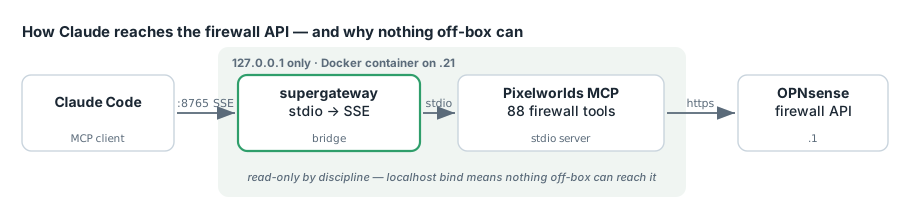
I wanted maximum coverage and a persistent networked container. Those pull in opposite directions, so the fix was a bridge: run the wide-coverage stdio server and wrap it with supergateway, a stdio→HTTP shim, inside the container. That exposes SSE on :8000 internally, published to 127.0.0.1:8765 on the host. Claude Code connects at http://localhost:8765/sse.
The container ended up as node:22-alpine running the Pixelworlds server plus supergateway, behind a compose file with a healthcheck and restart: unless-stopped. Registered with:
claude mcp add --scope user --transport sse opnsense http://localhost:8765/sse
A window reload later, Claude reported the handshake succeeded: 88 module tools loaded (24 core + 64 plugin), /healthz returning ok.
The safety posture (this part is not optional) #
Those 88 tools are full read/write, with no safety mode. They include firewall_manage / filterAddRule, core_manage / systemReboot, and core_manage / systemHalt. An MCP server for your firewall is, functionally, a remote root shell for your network perimeter. Two decisions kept that sane:
- Bind to localhost only. The container publishes to
127.0.0.1:8765, not0.0.0.0. Nothing off-box can reach it. If I ever needed remote access it’d go over the tailnet, never the LAN broadside. - Treat it as read-only by discipline. For the forensics work below I only ever called
*Search*/dnsReverseLookup/leases*functions. The write tools exist; I simply don’t call them.
A couple of debugging notes for anyone building this:
- API keys inherit their user’s privileges. My first API test returned HTTP 403, which looked like the MCP user lacked permissions. It was a false alarm — my hand-built Basic-auth header had mis-encoded the
/in the secret.curl -u key:secretreturned 200; the key was fine all along. (Redacting to state the obvious: don’t paste your key/secret anywhere it’ll be logged.) - OPNsense API auth is key + secret only. There’s no username field in the request. An
opnsense-api-userenv var, if a server documents one, is cosmetic — nothing sends it.
What it found: a device inventory in one question #
With the server live, I asked Claude to inventory the network from DHCP leases + ARP and reverse-look-up where the notable devices connect. The picture it assembled:
A flat /24 with a heavy IoT + utility footprint sharing the same L2 as my servers — a Samsung fridge and range, an LG TV, an Amcrest camera, an Amazon Echo, an Espressif (ESP) node, and an Enphase solar gateway. Every one of them egresses through a single rule: “Default allow LAN to any” (rule 41). The fridge, an unnamed microcontroller, and the solar inverter all have the exact same unrestricted internet access as my laptops.
Seeing it laid out like that is the value. “Flat network, allow-all egress” is the homelab default, and it reads very differently as a list of specific appliances with a permanent tunnel to the internet than as an abstraction.
Following the threads with reverse DNS #
Then the fun part — turning inferences into facts with diagnostics_manage / dnsReverseLookup on the notable destinations:
- Samsung fridge → vendor cloud on AWS (Ohio, plus a Tokyo endpoint). Normal for SmartThings — and a permanent outbound tunnel from a refrigerator.
- An unnamed Espressif node (
.121) → a Google Cloud–hosted backend (googleusercontent.com). Here’s the precision caveat worth stating plainly: a PTR confirms the hosting provider and region, not the application owner.googleusercontent.comtells you the ESP’s backend runs on GCP; it does not tell you whose product it is. A DIY ESPHome/Tasmota device would usually talk locally, so a cloud backend hinted this was a commercial gadget, not something I’d flashed. - Enphase solar gateway → its MQTT broker.
Cross-referencing a second data source to identify a mystery device #
The unnamed ESP at .121 bugged me. Was it mobile (a phone-adjacent thing) or fixed (a bulb, a plug)? The firewall alone couldn’t say — but my OpenWrt AP reports client signal strength to Prometheus (http://192.168.1.21:9090). So Claude pulled the device’s RSSI history straight from the Prometheus HTTP API:
# query readsb/openwrt station metrics for one MAC over time
u = P + "/api/v1/query?" + urllib.parse.urlencode({"query": query})
The signal was rock-steady and the device was essentially off every night from 01:00–08:00 — a stationary, scheduled gadget, not something that moves around. Combined with the GCP backend, that’s the profile of a cheap smart bulb or plug, not a phone. (The genuinely low-tech final step to confirm which bulb: unscrew them one at a time and watch the lease drop. Not every problem is solved in software.)
Takeaways #
- An MCP server turns your firewall into something Claude can reason over, not just something you paste logs from. “Inventory every device and tell me where it phones home” becomes one prompt.
- Bridge the transport gap with
supergatewaywhen you want a wide-coverage stdio server to run as a persistent networked container. - Bind firewall MCP to localhost and stay read-only by discipline — these tools can halt your perimeter; treat the server like the loaded gun it is.
- PTR lookups identify infrastructure, not owners. “It’s on Google Cloud” is a real clue, not a conclusion.
- Correlate independent sources. Firewall leases said what was connected; OpenWrt→Prometheus signal history said how it behaves — together they identified a device neither could alone.
The most useful output wasn’t a config change. It was finally seeing my own network — a flat segment where a fridge, a solar inverter, and an unidentified microcontroller all share the same unrestricted door to the internet. That’s the homelab default, and now it’s on my list to segment.